

IRS Refund Tracker: How to Track Your Refund and What to Do if You Encounter Issues
When tax season rolls around, many taxpayers eagerly await their tax refunds. Tracking the status of your refund has become easier with the IRS Refund Tracker. If you’re wondering how to use it, what issues you might face, or why it’s important, this guide is here to provide all the essential information you need.
In this post, we will explore the IRS Refund Tracker, how to use it, common challenges, and tips on how to resolve issues. Whether you’re a first-time filer or a seasoned taxpayer, understanding how to monitor your refund status can help you plan your finances effectively. So, let’s dive in!
What Is the IRS Refund Tracker?
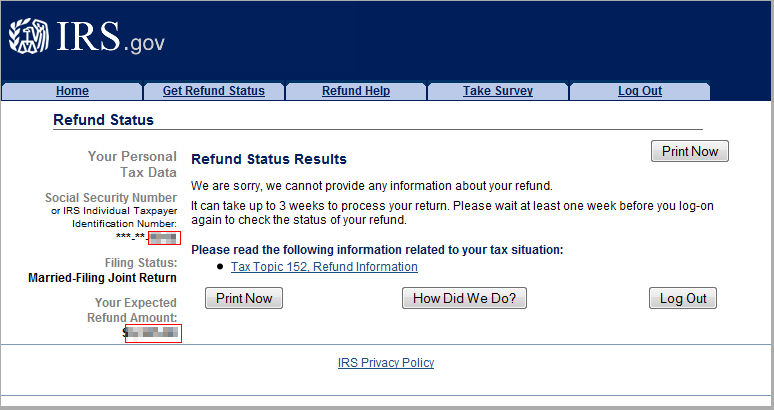
The IRS Refund Tracker, also known as Where’s My Refund, is an online tool provided by the Internal Revenue Service (IRS) that allows taxpayers to track the status of their tax refund. It provides real-time updates and helps you check when your refund will arrive, which is especially helpful if you are counting on that refund for an important expense.
The IRS Refund Tracker is available 24/7 and can be accessed from your computer or mobile device. All you need is basic information from your tax return, such as your filing status, Social Security number, and the exact refund amount.
Why Is the IRS Refund Tracker Important?
For many taxpayers, the IRS Refund Tracker is crucial because it offers insights into the refund process. Here’s why:
- Peace of Mind: Waiting for a refund can be stressful. By using the IRS Refund Tracker, you can track the status and eliminate any uncertainty.
- Quick Updates: The tool provides up-to-date information on the processing of your refund, including if your refund is being processed, when it’s expected to be issued, or if there are any issues.
- Faster Resolution: If there’s a delay or a problem, you can find out early and resolve the issue before it causes major disruptions.
How to Use the IRS Refund Tracker
To start tracking your refund, follow these simple steps:
- Go to the IRS Website: Navigate to the official IRS Refund Tracker website, which is called Where’s My Refund.
- Enter Your Information: You’ll need to provide:
- Your Social Security number (SSN) or Individual Taxpayer Identification Number (ITIN).
- Your filing status (single, married, etc.).
- The exact refund amount that you expect to receive, which you can find on your tax return (Form 1040).
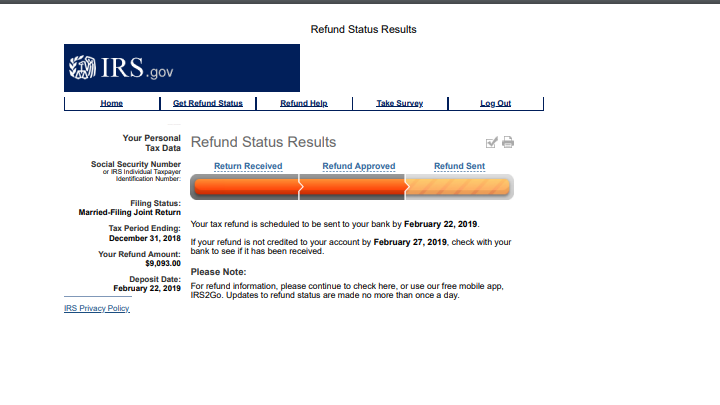
- Get Your Refund Status: Once you submit the information, the tool will show one of the following statuses:
- Received: The IRS has received your tax return and is processing it.
- Approved: Your refund has been approved and is scheduled to be sent.
- Sent: The refund has been sent, and you should expect to receive it soon.
How Often Should You Check the IRS Refund Tracker?
The IRS Refund Tracker updates once every 24 hours. Checking it multiple times a day won’t provide you with any additional information. Be patient and check your status at least once per day, especially in the first few days after filing.
Common Issues with the IRS Refund Tracker
While the IRS Refund Tracker is a helpful tool, it can sometimes show information that raises questions or concerns. Here are some common issues that users face:
1. Refund Status Not Available
This message may appear if your tax return is still being processed. The IRS Refund Tracker might not have updated yet, or your return might not have been processed completely.
Solution: Wait for a few days before checking again, or try using the “IRS Refund Tracker” during different hours of the day.
2. The Tool Says “Still Processing”
This can occur if there’s an issue with your tax return, such as incorrect or missing information. It can also happen if you filed your taxes closer to the deadline or if the IRS needs additional information from you.
Solution: Contact the IRS directly. They may ask for clarification or additional documentation before processing your refund.
3. Refund Amount Doesn’t Match What You Expected
If you notice a discrepancy in the amount of your refund, this could be due to several reasons, including IRS adjustments.
Solution: Double-check your tax return to make sure that your calculations were correct. If the issue persists, call the IRS.
4. Delayed Refunds
Delays can occur for various reasons, such as errors on your tax return or delays due to processing backlogs. While most refunds are processed within 21 days, delays are possible.
Solution: If you think your refund is delayed beyond the typical processing time, you can reach out to the IRS or check the status using the IRS Refund Tracker.
What If the IRS Refund Tracker Shows a Problem?
If the IRS Refund Tracker shows an issue with your refund, you may need to take action to resolve the matter. Below are some steps to consider:
- Review Your Tax Return: Check your return for errors or missing information. Even small mistakes can cause delays.
- Contact the IRS: If you’ve been waiting for a long time or if there’s no update on your refund, contacting the IRS can help you get more details.
- Check for Identity Theft: Sometimes, issues arise because of fraudulent activity or identity theft. If you suspect this, take the necessary steps to protect yourself and report it to the IRS.
Tips for Faster Refund Processing
If you’re looking to get your refund as quickly as possible, consider the following tips:
- E-File Your Tax Return: Electronic filing is faster than paper filing, and it reduces the chances of errors.
- Choose Direct Deposit: Opt for direct deposit rather than a paper check to receive your refund faster.
- File Early: The earlier you file, the quicker you can expect to receive your refund. Don’t wait until the last minute to file.
Troubleshooting Common Issues with the IRS Refund Tracker
If you encounter issues while using the IRS Refund Tracker, there are several things you can do:
- Ensure Your Information Is Correct: Double-check your SSN, filing status, and refund amount to make sure everything matches your tax return.
- Wait for Updates: Sometimes, it takes a few days for the IRS Refund Tracker to update after you file. Be patient and check back after 24-48 hours.
- Get Help from a Professional: If you’re unsure about any part of the process, it’s always a good idea to reach out to a tax professional. Tax experts can help you understand your situation and assist with resolving any issues.
Conclusion
The IRS Refund Tracker is an invaluable tool for taxpayers who want to stay informed about their refund status. By using this online tool, you can track your refund in real-time and take action if there are any issues. However, it’s essential to stay patient, especially if your refund is still processing, and always verify that your information is correct.
If you have any issues with the IRS Refund Tracker or need assistance with your tax return, don’t hesitate to reach out to a trusted professional. At Syed Professional Services, we’re here to help you navigate tax season and ensure everything goes smoothly.
Feel free to contact us with any questions or concerns you have about your taxes or immigration status. We’re here to provide expert advice and services tailored to your needs!

